# GitHub Copilot with Keln
Use Keln models in Copilot Chat in VS Code by adding Keln as a custom endpoint. The models then
appear in the chat model picker.
## What you need to start
- VS Code 1.129 or later with Copilot Chat.
- A Keln API key. Sign up at [app.keln.ai](https://app.keln.ai), then open **Keys** →
**Create key**.
On Copilot Business and Enterprise, an administrator can turn off the
**Bring Your Own Language Model Key in VS Code** policy. If **Add Models** is greyed out, ask your
administrator.
## Connect Copilot Chat to Keln
### 1. Open the Language Models editor
Open the Chat view. In the model picker of the chat input, click **Manage Language Models** (the
gear icon). You can also run **Chat: Manage Language Models** from the Command Palette.
### 2. Add a Custom Endpoint
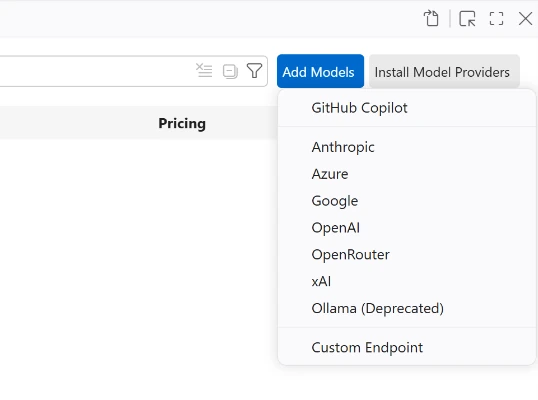
Click **Add Models** and choose **Custom Endpoint**. VS Code asks for 3 values:
<div class="kd-fields" markdown>
| VS Code asks for | Enter |
|---|---|
| Group name | `Keln`{ .kd-val } |
| API key | `sk-keln-…`{ .kd-key } your key |
| API type | `Chat Completions` |
</div>
<figure class="kd-figure kd-figure--narrow" markdown>
{ loading=lazy }
</figure>
### 3. List the Keln models
VS Code opens `chatLanguageModels.json` with a new entry for Keln. Replace only the `models`
list in that entry with the Keln models you want. Keep the other lines as VS Code wrote them. The
`apiKey` line points to your saved key:
```json
[
  {
    "name": "Keln",
    "vendor": "customendpoint",
    "apiKey": "${input:chat.lm.secret.…}",
    "apiType": "chat-completions",
    "models": [
      {
        "id": "zai-org/glm-5.3",
        "name": "zai-org/glm-5.3",
        "url": "https://api.keln.ai/v1/chat/completions",
        "toolCalling": true,
        "vision": false,
        "contextWindow": 1048576,
        "maxOutputTokens": 32768,
        "supportsReasoningEffort": ["low", "medium", "high"]
      },
      {
        "id": "moonshotai/kimi-k3",
        "name": "moonshotai/kimi-k3",
        "url": "https://api.keln.ai/v1/chat/completions",
        "toolCalling": true,
        "vision": true,
        "contextWindow": 1048576,
        "maxOutputTokens": 32768,
        "supportsReasoningEffort": ["low", "medium", "high"]
      }
    ]
  }
]
```
The `supportsReasoningEffort` line adds an **Effort Level** picker (Low, Medium, High) for the model. Without it,
Keln runs the model at its deepest thinking level.
Save the file.
### 4. Pick a Keln model
Open the model picker in the chat input and choose a Keln model. If the models are missing,
restart VS Code.
Before your first message, add credit under **Billing** → **Add credit**. Keln returns a `402` error if your balance is empty.
## Models
Copilot Chat works with all Keln chat models. Add one `models` entry for each model you want. See
[Models & pricing](models-pricing.md) for the full list, with each model's context window, image
support and pricing.
## Usage
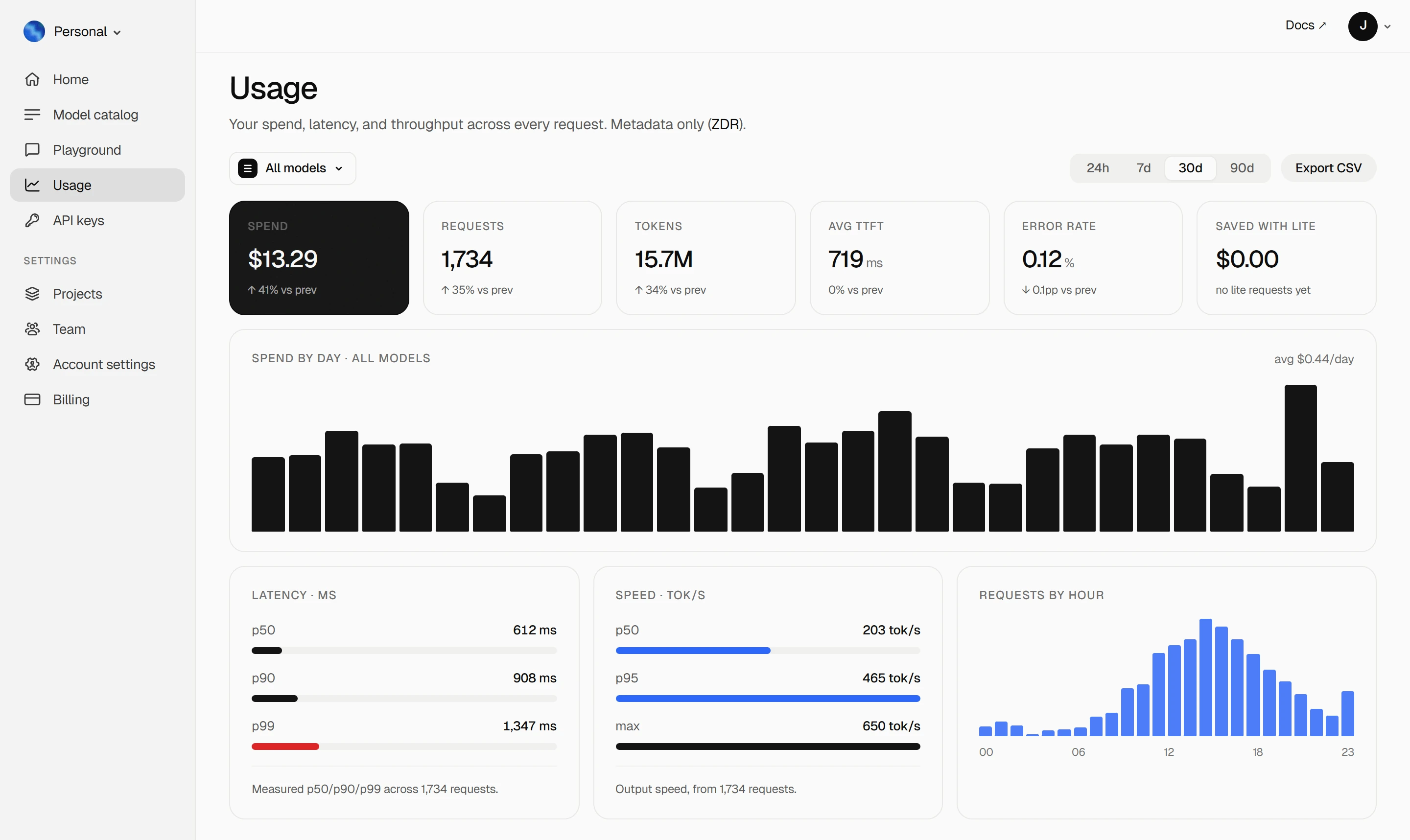
Your Keln **Usage** page shows your spend, tokens, latency and error rate. Keln stores metadata
only ([ZDR](capabilities/privacy.md)).
<figure class="kd-figure kd-figure--bento" markdown>
{ loading=lazy }
</figure>
<div class="kd-figure-cta" markdown>
[Create Keln account](https://app.keln.ai/signup){ .md-button .md-button--primary }
</div>
## What stays on GitHub
Keln serves the chat and agent requests for the models you added. Inline code suggestions,
semantic search, chat titles and commit messages stay on your GitHub Copilot account. The setting
**Chat: Byok Utility Model Default** chooses the model for VS Code's built-in utility tasks when
your chat model is a Keln model.
## Switch back
Pick a built-in model in the chat model picker. To remove Keln, open **Manage Language Models**
and delete the Keln group.
## Where to go next
<div class="grid cards" markdown>
- [OpenAI SDK and compatible clients ↗](api/index.md)
Connect Keln to Python, TypeScript, LangChain, Vercel AI SDK, or curl.
- [Anthropic-compatible API ↗](api/anthropic.md)
Use Keln models with the Anthropic SDK and Messages API.
</div>
## Try Keln
Create a Keln account and API key to run open models in GitHub Copilot.
[Get an API key](https://app.keln.ai/signup){ .md-button .md-button--primary }
[Models & pricing ↗](models-pricing.md){ .md-button }
GitHub Copilot with Keln
Use Keln models in Copilot Chat in VS Code by adding Keln as a custom endpoint. The models then
appear in the chat model picker.
What you need to start
VS Code 1.129 or later with Copilot Chat.
A Keln API key. Sign up at app.keln.ai, then open Keys →
Create key.
On Copilot Business and Enterprise, an administrator can turn off the
Bring Your Own Language Model Key in VS Code policy. If Add Models is greyed out, ask your
administrator.
Connect Copilot Chat to Keln
1. Open the Language Models editor
Open the Chat view. In the model picker of the chat input, click Manage Language Models (the
gear icon). You can also run Chat: Manage Language Models from the Command Palette.
2. Add a Custom Endpoint
Click Add Models and choose Custom Endpoint. VS Code asks for 3 values:
VS Code asks for
Enter
Group name
Keln
API key
sk-keln-… your key
API type
Chat Completions
3. List the Keln models
VS Code opens chatLanguageModels.json with a new entry for Keln. Replace only the models
list in that entry with the Keln models you want. Keep the other lines as VS Code wrote them. The
apiKey line points to your saved key:
The supportsReasoningEffort line adds an Effort Level picker (Low, Medium, High) for the model. Without it,
Keln runs the model at its deepest thinking level.
Save the file.
4. Pick a Keln model
Open the model picker in the chat input and choose a Keln model. If the models are missing,
restart VS Code.
Before your first message, add credit under Billing → Add credit. Keln returns a 402 error if your balance is empty.
Models
Copilot Chat works with all Keln chat models. Add one models entry for each model you want. See
Models & pricing for the full list, with each model's context window, image
support and pricing.
Usage
Your Keln Usage page shows your spend, tokens, latency and error rate. Keln stores metadata
only (ZDR).
Keln serves the chat and agent requests for the models you added. Inline code suggestions,
semantic search, chat titles and commit messages stay on your GitHub Copilot account. The setting
Chat: Byok Utility Model Default chooses the model for VS Code's built-in utility tasks when
your chat model is a Keln model.
Switch back
Pick a built-in model in the chat model picker. To remove Keln, open Manage Language Models
and delete the Keln group.