# LangChain with Keln
Run Keln models in LangChain using the `langchain-keln` package. It provides `ChatKeln`, which
supports chains, agents, tool calling, and structured output.
## Before you start
- Python 3.10 or newer.
- A Keln API key. Sign up at [app.keln.ai](https://app.keln.ai), then go to **Keys** →
**Create key**.
## Connect LangChain to Keln
### 1. Install the package
```bash
pip install langchain-keln
```
### 2. Set your API key
`ChatKeln` reads your API key from the `KELN_API_KEY` environment variable.
=== "macOS and Linux"
```bash
export KELN_API_KEY=sk-keln-…
```
=== "Windows PowerShell"
```powershell
$env:KELN_API_KEY = "sk-keln-…"
```
Add credit under **Billing** → **Add credit** before making your first request. Keln returns a `402` error if your balance is empty.
### 3. Send a message
```python
from langchain_keln import ChatKeln

model = ChatKeln(model="zai-org/glm-5.3")
reply = model.invoke("What is retrieval-augmented generation? Answer in 2 sentences.")
print(reply.content)
```
To stream responses, use `model.stream(...)` instead of `model.invoke(...)`.
## Tool calling
Use `bind_tools(...)` to give the model access to your tools. `ChatKeln` returns the tool calls in
the response.
```python
from langchain_core.tools import tool
from langchain_keln import ChatKeln


@tool
def get_weather(city: str) -> str:
    """Get the current weather for a city."""
    return f"It is 21°C and sunny in {city}."


model = ChatKeln(model="zai-org/glm-5.3").bind_tools([get_weather])
reply = model.invoke("What is the weather in Paris?")
print(reply.tool_calls)
```
`ChatKeln` also supports structured output with `with_structured_output(...)`. For reasoning
models, it preserves reasoning across turns in a tool-calling loop.
## Reasoning
Control how much a model reasons with `reasoning_effort`, such as `"low"`, `"high"`, or `"max"`.
```python
model = ChatKeln(model="zai-org/glm-5.3", reasoning_effort="low")
```
Each model supports different reasoning levels, listed in [`GET /v1/models`](api/models.md). If
you don't set a level, the model uses its default. See [Reasoning control](capabilities/reasoning.md).
## Models
`ChatKeln` supports all Keln chat models. Pass a model ID such as `moonshotai/kimi-k3` or
`deepseek-ai/deepseek-v4.1-flash`. See [Models & pricing](models-pricing.md) for available models
and pricing.
## Usage
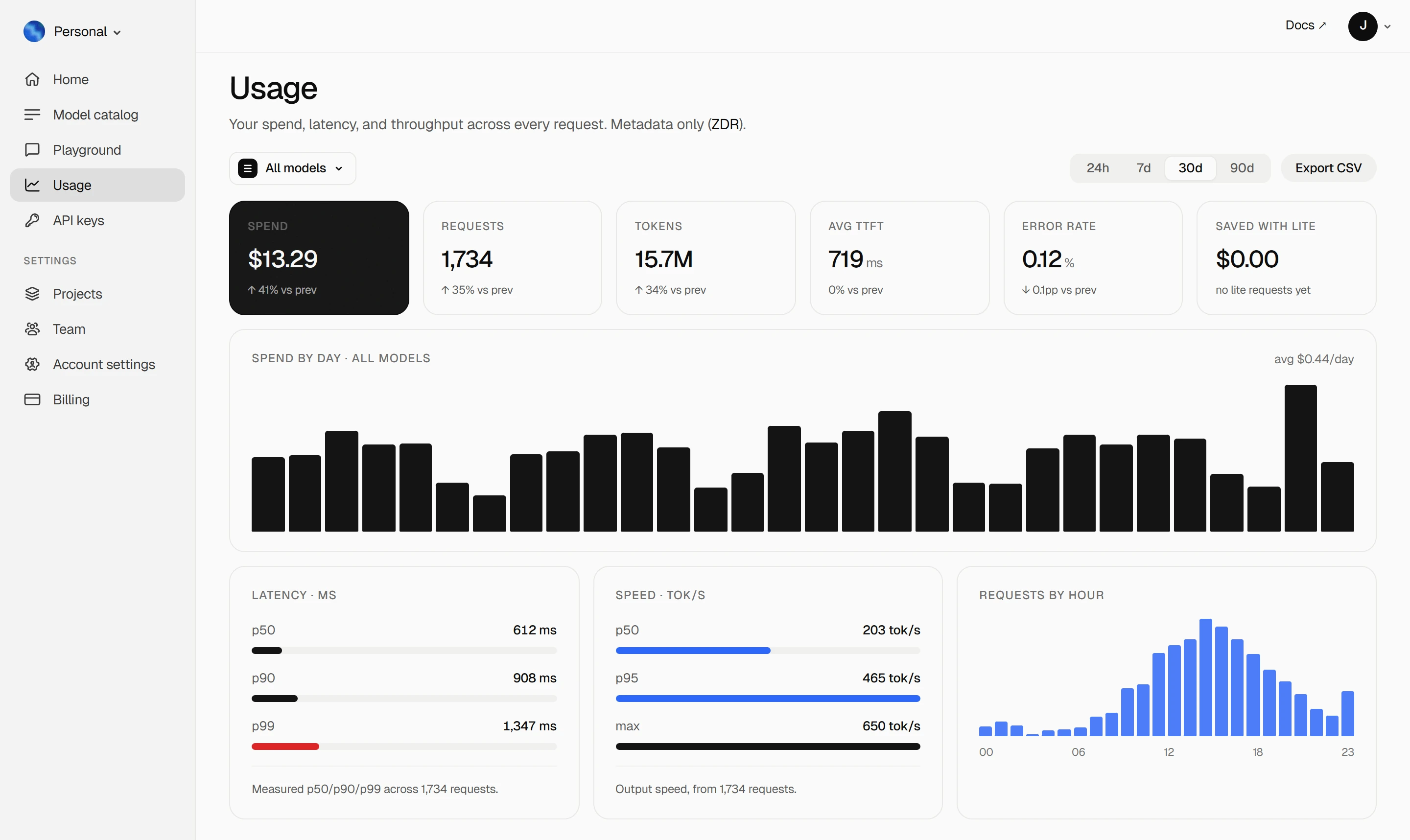
Track spending, token usage, latency, and error rates on your Keln **Usage** page. Keln stores
request metadata only, not prompts or responses. See [Zero data retention](capabilities/privacy.md).
<figure class="kd-figure kd-figure--bento" markdown>
{ loading=lazy }
</figure>
<div class="kd-figure-cta" markdown>
[Create Keln account](https://app.keln.ai/signup){ .md-button .md-button--primary }
</div>
## Where to go next
<div class="grid cards" markdown>
- [OpenAI SDK and compatible clients ↗](api/index.md)
Connect Keln to Python, TypeScript, LangChain, Vercel AI SDK, or curl.
- [Structured outputs & tools ↗](capabilities/structured-outputs.md)
Get JSON that matches your schema, and let models call your tools.
</div>
## Try Keln
Create a Keln account and API key to run open models in LangChain.
[Get an API key](https://app.keln.ai/signup){ .md-button .md-button--primary }
[Models & pricing ↗](models-pricing.md){ .md-button }
LangChain with Keln
Run Keln models in LangChain using the langchain-keln package. It provides ChatKeln, which
supports chains, agents, tool calling, and structured output.
Before you start
Python 3.10 or newer.
A Keln API key. Sign up at app.keln.ai, then go to Keys →
Create key.
Connect LangChain to Keln
1. Install the package
pipinstalllangchain-keln
2. Set your API key
ChatKeln reads your API key from the KELN_API_KEY environment variable.
exportKELN_API_KEY=sk-keln-…
$env:KELN_API_KEY="sk-keln-…"
Add credit under Billing → Add credit before making your first request. Keln returns a 402 error if your balance is empty.
3. Send a message
fromlangchain_kelnimportChatKelnmodel=ChatKeln(model="zai-org/glm-5.3")reply=model.invoke("What is retrieval-augmented generation? Answer in 2 sentences.")print(reply.content)
To stream responses, use model.stream(...) instead of model.invoke(...).
Tool calling
Use bind_tools(...) to give the model access to your tools. ChatKeln returns the tool calls in
the response.
fromlangchain_core.toolsimporttoolfromlangchain_kelnimportChatKeln@tooldefget_weather(city:str)->str:"""Get the current weather for a city."""returnf"It is 21°C and sunny in {city}."model=ChatKeln(model="zai-org/glm-5.3").bind_tools([get_weather])reply=model.invoke("What is the weather in Paris?")print(reply.tool_calls)
ChatKeln also supports structured output with with_structured_output(...). For reasoning
models, it preserves reasoning across turns in a tool-calling loop.
Reasoning
Control how much a model reasons with reasoning_effort, such as "low", "high", or "max".
Each model supports different reasoning levels, listed in GET /v1/models. If
you don't set a level, the model uses its default. See Reasoning control.
Models
ChatKeln supports all Keln chat models. Pass a model ID such as moonshotai/kimi-k3 or
deepseek-ai/deepseek-v4.1-flash. See Models & pricing for available models
and pricing.
Usage
Track spending, token usage, latency, and error rates on your Keln Usage page. Keln stores
request metadata only, not prompts or responses. See Zero data retention.