# Open WebUI with Keln
Chat with Keln models in Open WebUI. Add Keln as a connection and its models appear in the model
selector.
## What you need to start
- Open WebUI running, and an admin account on it.
- A Keln API key. Sign up at [app.keln.ai](https://app.keln.ai), then open **Keys** →
**Create key**.
## Connect Open WebUI to Keln
### 1. Open the connections page
In Open WebUI, open **Settings** → **Admin** → **Connections** and find the
**Manage OpenAI API Connections** list.
### 2. Add the Keln connection
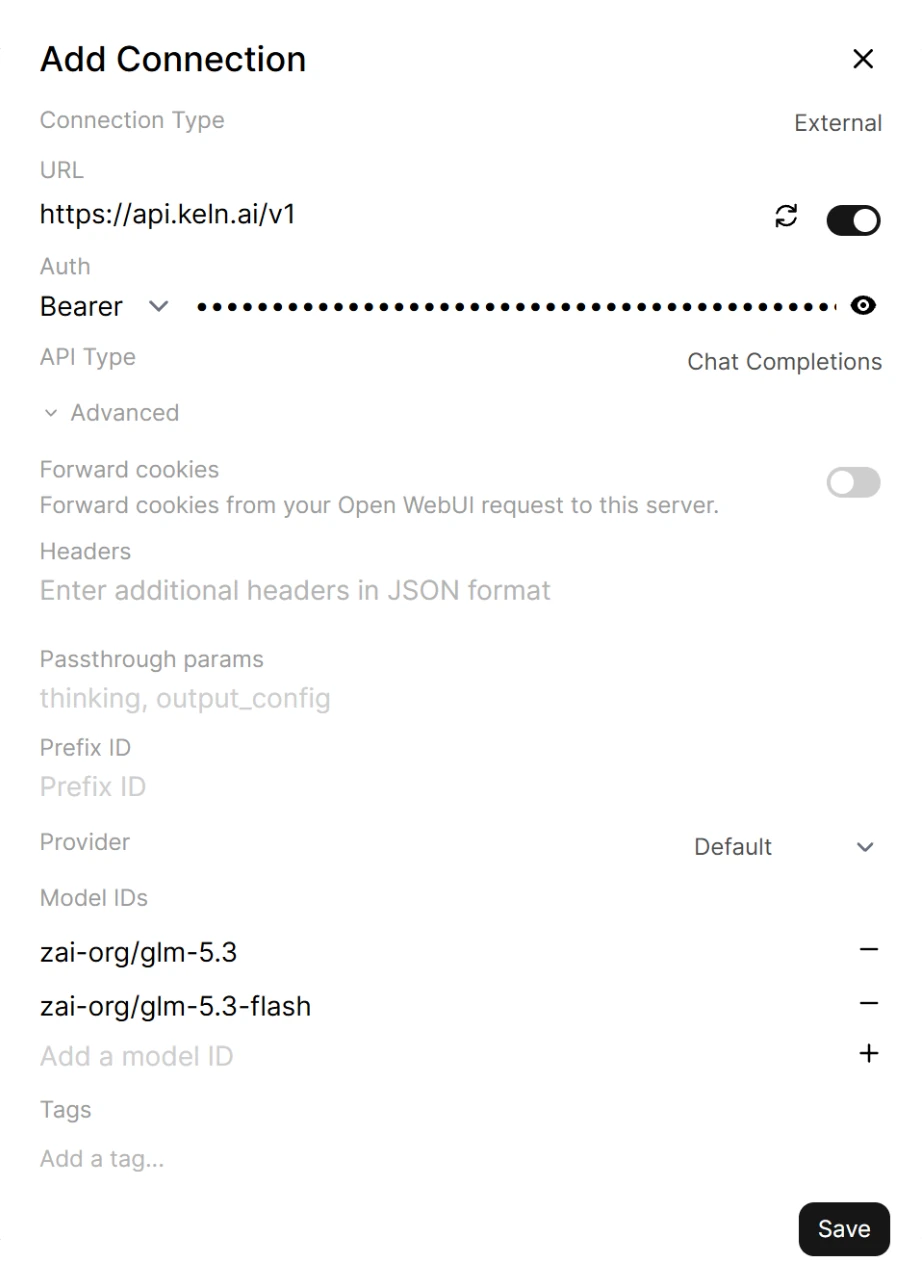
Click **+** next to **Manage OpenAI API Connections** and fill in:
<div class="kd-fields" markdown>
| Field | Value |
|---|---|
| URL | `https://api.keln.ai/v1`{ .kd-val } |
| API Key | `sk-keln-…`{ .kd-key } your key |
</div>
Enter the URL without a slash at the end.
### 3. Choose the models to show
Open WebUI loads the model list from Keln. It also includes non-chat models: decision,
speech, transcription, embedding and rerank models. To show only chat models, click **Advanced**.
Under **Model IDs**, type one model ID and click **+**. Repeat for each model you want, for
example:
```text
zai-org/glm-5.3
zai-org/glm-5.3-flash
moonshotai/kimi-k3
qwen/qwen3.8-2.4t-a95b
deepseek-ai/deepseek-v4.1-flash
```
Click **Save**.
<figure class="kd-figure kd-figure--narrow" markdown>
{ loading=lazy }
</figure>
Open WebUI's connection check passes with any key. If your first message returns a `401` error,
check the key.
### 4. Pick a model and chat
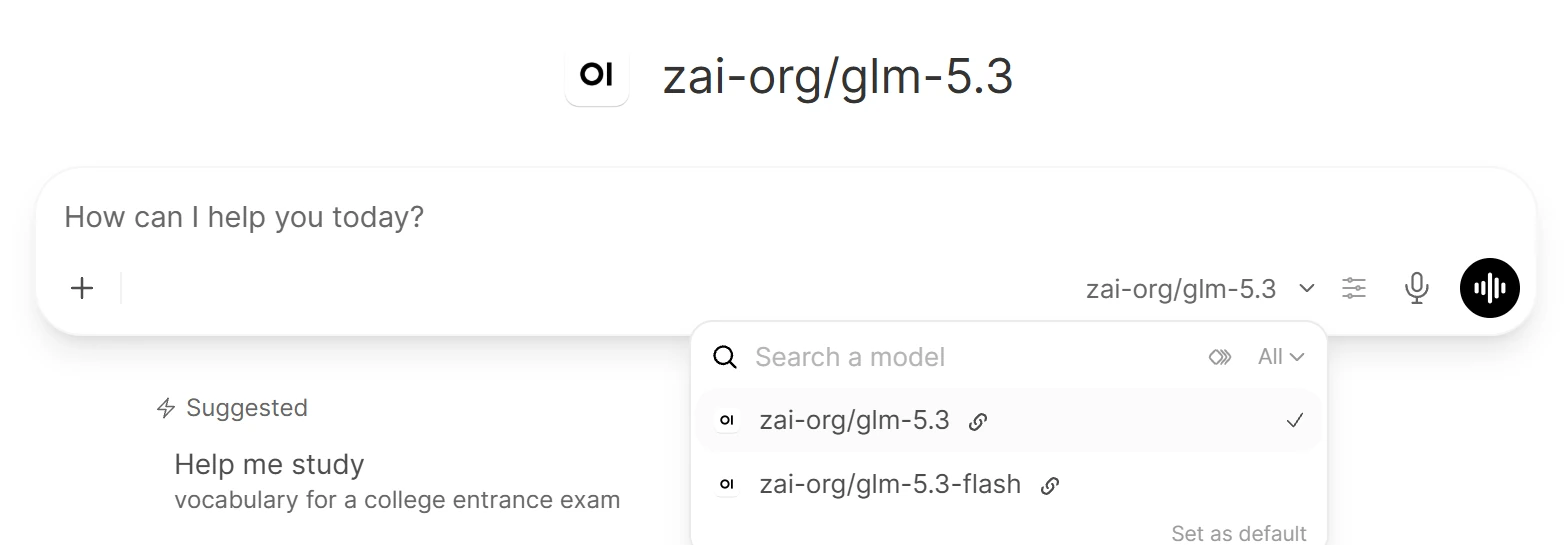
Start a new chat and open the model selector in the message box. Pick a Keln model and send a
message.
<figure class="kd-figure" markdown>
{ loading=lazy }
</figure>
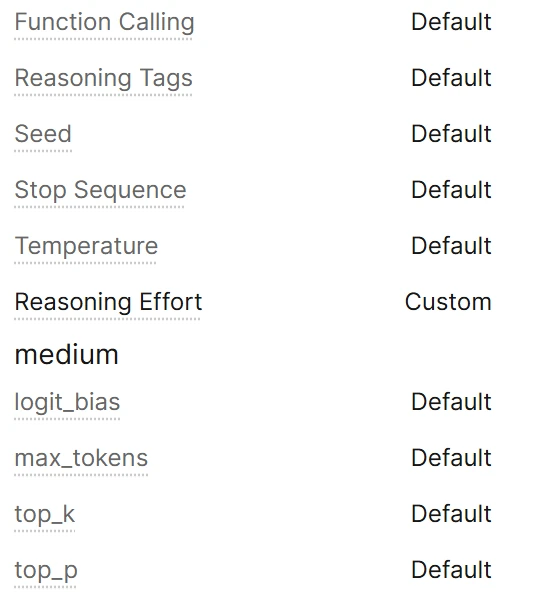
Open WebUI sends no reasoning setting, so Keln runs the model at its deepest thinking level. To
lower it, click the controls icon in the message box, open **Advanced Params**, click **Default**
next to **Reasoning Effort** and enter `low` or `medium`. Avoid `none` on GLM 5.3, GLM 5.3 Flash
and Qwen. Those models always think, and Keln returns a `400` error
([Reasoning control](capabilities/reasoning.md#models-that-cannot-disable-reasoning)).
<figure class="kd-figure kd-figure--narrow" markdown>
{ loading=lazy }
</figure>
Open WebUI enables **Vision** for every model. For a text-only model such as `zai-org/glm-5.3`,
open **Settings** → **Admin** → **Models**, click the pencil icon, turn **Vision** off under
**Capabilities** and click **Save & Update**.
New models are **Private**. Only admins can see them. To share one, open the model, click
**Access** and choose **Public**.
Before your first message, add credit under **Billing** → **Add credit**. Keln returns a `402` error if your balance is empty.
## Models
Open WebUI works with all Keln chat models. See [Models & pricing](models-pricing.md) for the full
list, with each model's context window, image support and pricing.
## Usage
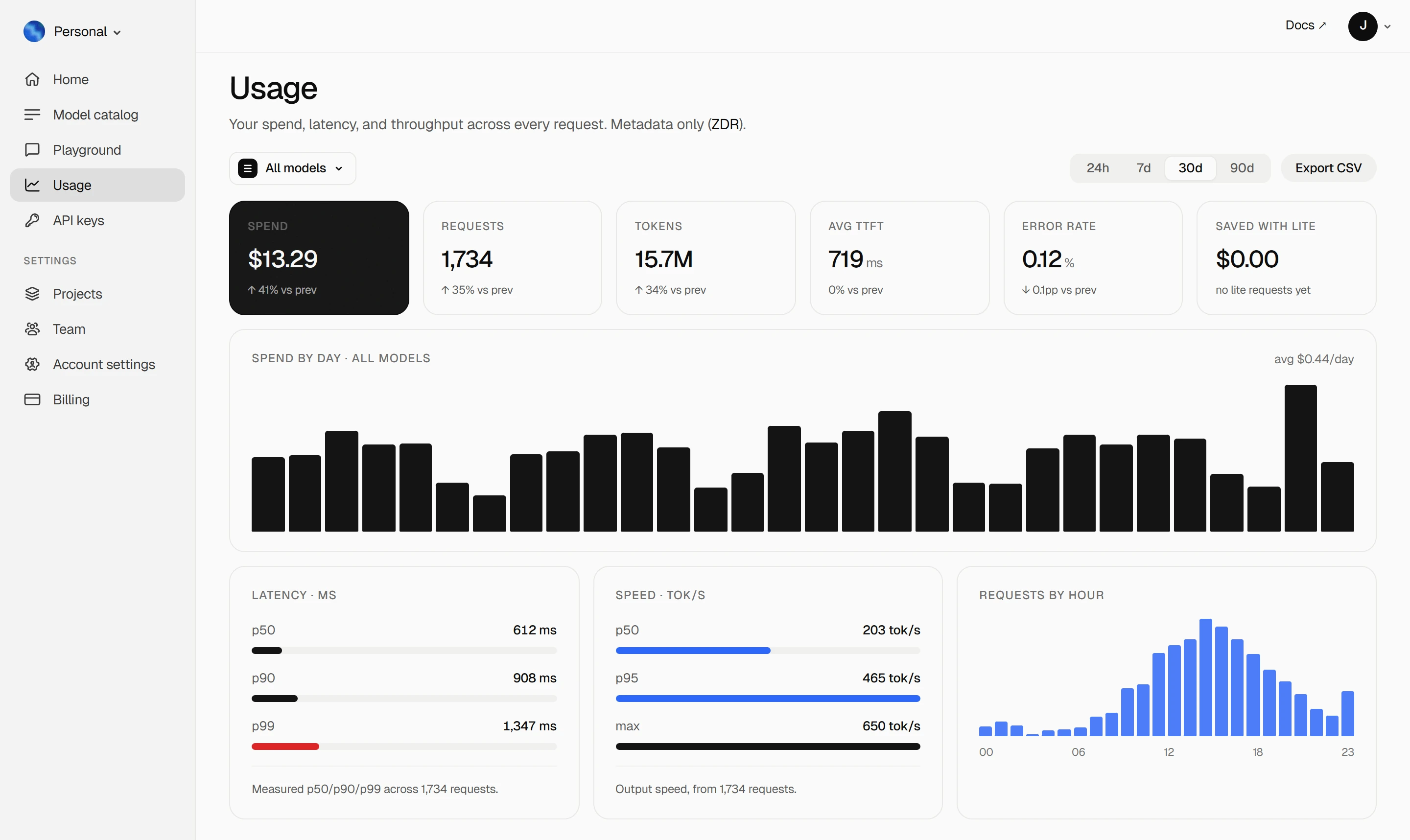
Your Keln **Usage** page shows your spend, tokens, latency and error rate. Keln stores metadata
only ([ZDR](capabilities/privacy.md)).
<figure class="kd-figure kd-figure--bento" markdown>
{ loading=lazy }
</figure>
<div class="kd-figure-cta" markdown>
[Create Keln account](https://app.keln.ai/signup){ .md-button .md-button--primary }
</div>
## Turn Keln off
Each connection has a toggle on the **Connections** page. Turn the Keln connection off to hide its
models, and on again to bring them back. Open WebUI keeps the URL and key.
## Where to go next
<div class="grid cards" markdown>
- [OpenAI SDK and compatible clients ↗](api/index.md)
Connect Keln to Python, TypeScript, LangChain, Vercel AI SDK, or curl.
- [Anthropic-compatible API ↗](api/anthropic.md)
Use Keln models with the Anthropic SDK and Messages API.
</div>
## Try Keln
Create a Keln account and API key to run open models in Open WebUI.
[Get an API key](https://app.keln.ai/signup){ .md-button .md-button--primary }
[Models & pricing ↗](models-pricing.md){ .md-button }
Open WebUI with Keln
Chat with Keln models in Open WebUI. Add Keln as a connection and its models appear in the model
selector.
What you need to start
Open WebUI running, and an admin account on it.
A Keln API key. Sign up at app.keln.ai, then open Keys →
Create key.
Connect Open WebUI to Keln
1. Open the connections page
In Open WebUI, open Settings → Admin → Connections and find the
Manage OpenAI API Connections list.
2. Add the Keln connection
Click + next to Manage OpenAI API Connections and fill in:
Field
Value
URL
https://api.keln.ai/v1
API Key
sk-keln-… your key
Enter the URL without a slash at the end.
3. Choose the models to show
Open WebUI loads the model list from Keln. It also includes non-chat models: decision,
speech, transcription, embedding and rerank models. To show only chat models, click Advanced.
Under Model IDs, type one model ID and click +. Repeat for each model you want, for
example:
Open WebUI's connection check passes with any key. If your first message returns a 401 error,
check the key.
4. Pick a model and chat
Start a new chat and open the model selector in the message box. Pick a Keln model and send a
message.
Open WebUI sends no reasoning setting, so Keln runs the model at its deepest thinking level. To
lower it, click the controls icon in the message box, open Advanced Params, click Default
next to Reasoning Effort and enter low or medium. Avoid none on GLM 5.3, GLM 5.3 Flash
and Qwen. Those models always think, and Keln returns a 400 error
(Reasoning control).
Open WebUI enables Vision for every model. For a text-only model such as zai-org/glm-5.3,
open Settings → Admin → Models, click the pencil icon, turn Vision off under
Capabilities and click Save & Update.
New models are Private. Only admins can see them. To share one, open the model, click
Access and choose Public.
Before your first message, add credit under Billing → Add credit. Keln returns a 402 error if your balance is empty.
Models
Open WebUI works with all Keln chat models. See Models & pricing for the full
list, with each model's context window, image support and pricing.
Usage
Your Keln Usage page shows your spend, tokens, latency and error rate. Keln stores metadata
only (ZDR).
Each connection has a toggle on the Connections page. Turn the Keln connection off to hide its
models, and on again to bring them back. Open WebUI keeps the URL and key.