# Hermes Agent with Keln
Run Hermes Agent on Keln models by installing the Keln provider plugin.
## Before you start
- Hermes Agent 0.22.6 or newer.
- A Keln API key. Sign up at [app.keln.ai](https://app.keln.ai), then open **Keys** →
**Create key**.
## Connect Hermes Agent to Keln
### 1. Install the Keln provider
```bash
hermes plugins install keln-provider
```
Enter the following when prompted:
<div class="kd-fields" markdown>
| Hermes asks for | Enter |
|---|---|
| `KELN_API_KEY` | `sk-keln-…`{ .kd-key } your key |
| Enable 'keln-provider' now? | `y`{ .kd-val } |
</div>
Hermes saves the key in `~/.hermes/.env`.
If Hermes did not ask for the key, or you skipped it, add it with:
```bash
hermes config set KELN_API_KEY sk-keln-…
```
### 2. Choose Keln
```bash
hermes model
```
Enter the following when prompted:
<div class="kd-fields" markdown>
| Hermes asks for | Enter |
|---|---|
| Provider | **Keln** |
| Keln API key: [K]eep / [R]eplace / [C]lear | Press **Enter** to keep your key |
| Base URL | Press **Enter** to keep `https://api.keln.ai/v1`{ .kd-val } |
| Model | A chat model, for example `moonshotai/kimi-k3`{ .kd-val } |
</div>
Don't skip this step. Installing the plugin selects Keln as the provider, but Hermes keeps
its default model until you choose a Keln model here.
### 3. Start a chat
In Terminal:
```bash
hermes chat
```
Or open the **Hermes** app and start a new chat. The model menu next to the message box shows
a short list under **KELN**. To find another Keln model, type its name in **Search models**,
for example `glm`. Click ☆ next to a model to keep it at the top of the menu.
Chats that were already open keep their old model. Start a new chat after you switch.
Add credit under **Billing** → **Add credit** before you start chatting. Keln returns a `402` error if your balance is empty.
## Models
Hermes Agent works with all Keln chat models. See [Models & pricing](models-pricing.md) for the
full list and pricing.
Hermes also lists other Keln models for speech, transcription, embeddings, reranking, and
decisions. These can't be used as the agent's main model.
Want to pay less? Open the **API keys** page on Keln and set your key's mode to **Lite**. You'll
get the same model at a lower price, though it may be slower than Standard.
Learn more about [Standard and Lite modes](capabilities/lite.md).
## Usage
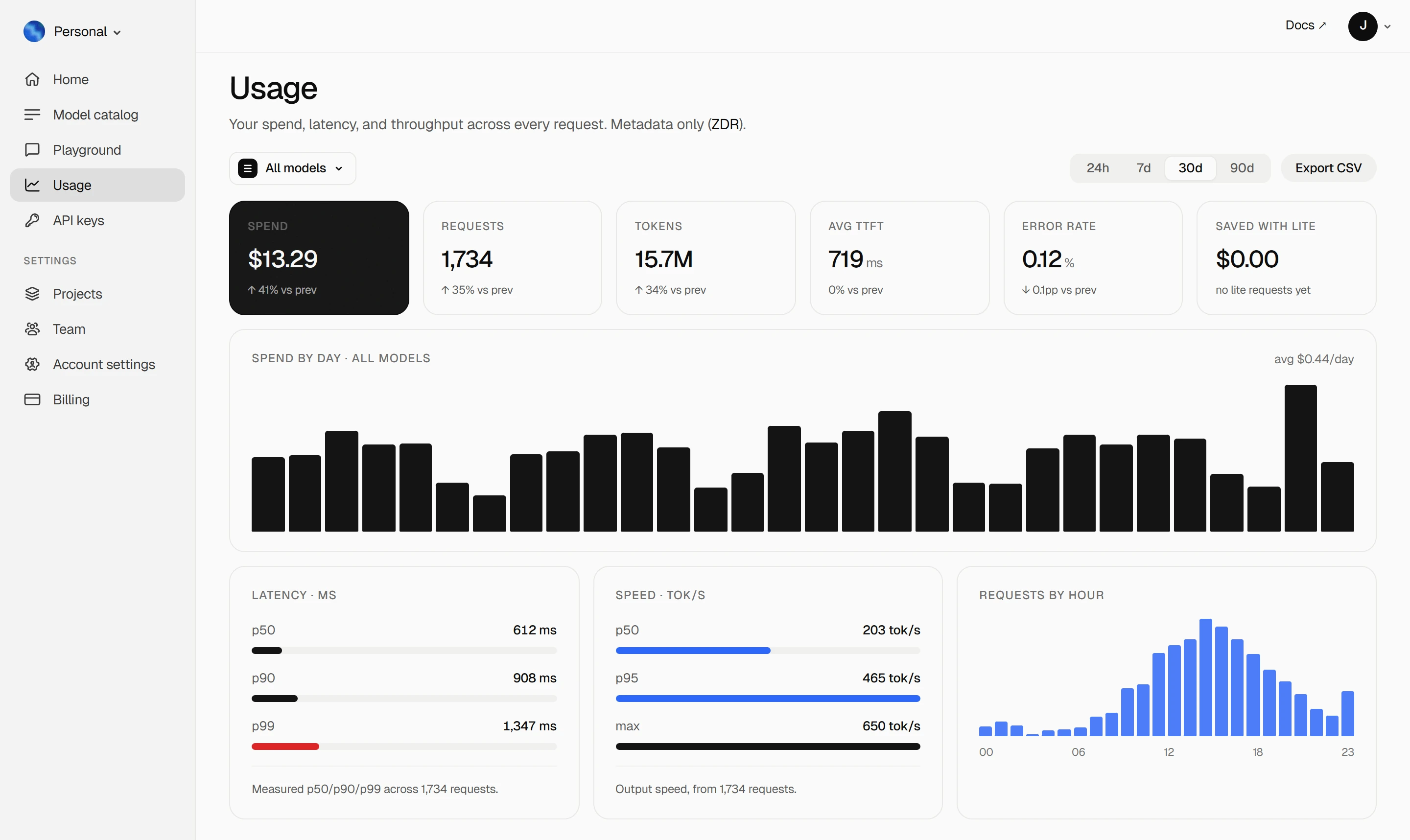
Your Keln **Usage** page shows your spend, tokens, latency, and error rate. Keln stores usage
metadata, not your prompts or responses ([ZDR](capabilities/privacy.md)).
<figure class="kd-figure kd-figure--bento" markdown>
{ loading=lazy }
</figure>
<div class="kd-figure-cta" markdown>
[Create Keln account](https://app.keln.ai/signup){ .md-button .md-button--primary }
</div>
## Switch models
Run `hermes model` to change the default model for new chats.
To switch only the chat you're in, type:
```
/model zai-org/glm-5.3 --provider keln
```
## Where to go next
<div class="grid cards" markdown>
- [OpenAI SDK and compatible clients ↗](api/index.md)
Connect Keln to Python, TypeScript, LangChain, Vercel AI SDK, or curl.
- [Anthropic-compatible API ↗](api/anthropic.md)
Use Keln models with the Anthropic SDK and Messages API.
</div>
## Try Keln
Get a Keln API key to start using open models in Hermes Agent.
[Get an API key](https://app.keln.ai/signup){ .md-button .md-button--primary }
[Models & pricing ↗](models-pricing.md){ .md-button }
Hermes Agent with Keln
Run Hermes Agent on Keln models by installing the Keln provider plugin.
Before you start
Hermes Agent 0.22.6 or newer.
A Keln API key. Sign up at app.keln.ai, then open Keys →
Create key.
Connect Hermes Agent to Keln
1. Install the Keln provider
hermespluginsinstallkeln-provider
Enter the following when prompted:
Hermes asks for
Enter
KELN_API_KEY
sk-keln-… your key
Enable 'keln-provider' now?
y
Hermes saves the key in ~/.hermes/.env.
If Hermes did not ask for the key, or you skipped it, add it with:
hermesconfigsetKELN_API_KEYsk-keln-…
2. Choose Keln
hermesmodel
Enter the following when prompted:
Hermes asks for
Enter
Provider
Keln
Keln API key: [K]eep / [R]eplace / [C]lear
Press Enter to keep your key
Base URL
Press Enter to keep https://api.keln.ai/v1
Model
A chat model, for example moonshotai/kimi-k3
Don't skip this step. Installing the plugin selects Keln as the provider, but Hermes keeps
its default model until you choose a Keln model here.
3. Start a chat
In Terminal:
hermeschat
Or open the Hermes app and start a new chat. The model menu next to the message box shows
a short list under KELN. To find another Keln model, type its name in Search models,
for example glm. Click ☆ next to a model to keep it at the top of the menu.
Chats that were already open keep their old model. Start a new chat after you switch.
Add credit under Billing → Add credit before you start chatting. Keln returns a 402 error if your balance is empty.
Models
Hermes Agent works with all Keln chat models. See Models & pricing for the
full list and pricing.
Hermes also lists other Keln models for speech, transcription, embeddings, reranking, and
decisions. These can't be used as the agent's main model.
Want to pay less? Open the API keys page on Keln and set your key's mode to Lite. You'll
get the same model at a lower price, though it may be slower than Standard.