# OpenClaw with Keln
Run OpenClaw on Keln models with the Keln plugin from ClawHub. The plugin loads the live model
list from Keln.
## What you need to start
- OpenClaw 2026.11.1 or newer. It runs on Node 24.16 or newer in the 24 line, or on Node 26.1
or newer.
- A Keln API key. Sign up at [app.keln.ai](https://app.keln.ai), then open **Keys** →
**Create key**.
## Connect OpenClaw to Keln
### 1. Install the Keln provider
```bash
openclaw plugins install clawhub:@keln/openclaw-keln-provider --accept-capabilities
```
The flag lets the plugin add Keln as a model provider.
OpenClaw shows the plugin's security audit and asks `Proceed with installation?`. Type `y`.
### 2. Save your Keln key
```bash
openclaw models auth paste-api-key --provider keln
```
Paste the key when OpenClaw asks for it. OpenClaw stores the key.
If OpenClaw says the Gateway has not applied the settings, run `openclaw gateway restart`.
### 3. Pick a Keln model
Set a Keln model as the default:
```bash
openclaw models set keln/zai-org/glm-5.3
```
To change the model inside a chat, send `/model keln/moonshotai/kimi-k3`.
Before your first message, add credit under **Billing** → **Add credit**. Keln returns a `402` error if your balance is empty.
## Models
OpenClaw loads the current Keln catalog, including each model's price, context window and input
types. The plugin lists every chat model in the Keln catalog. See [Models & pricing](models-pricing.md) for the full list and pricing.
## Usage
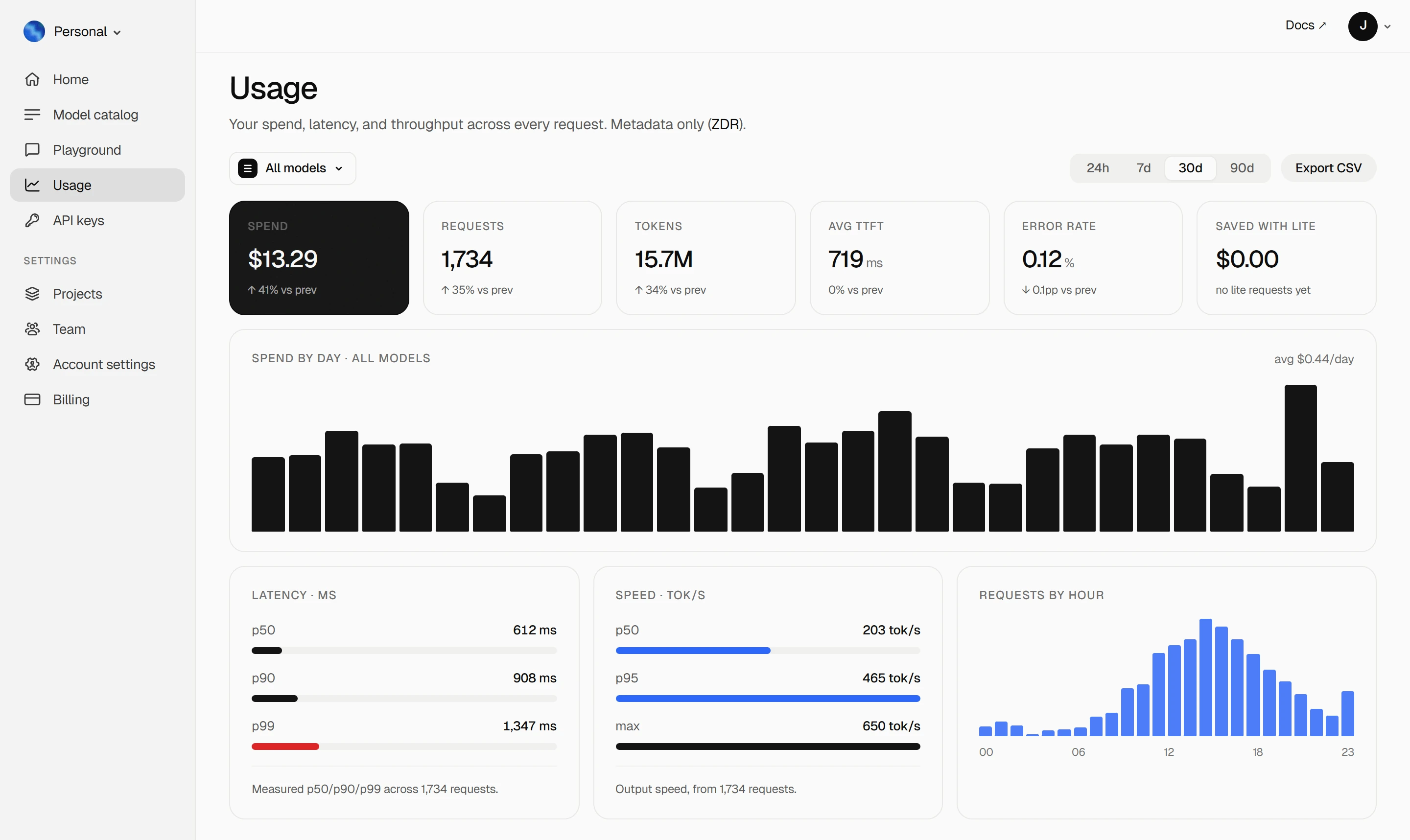
Your Keln **Usage** page shows your spend, tokens, latency and error rate. Keln stores metadata
only ([ZDR](capabilities/privacy.md)).
<figure class="kd-figure kd-figure--bento" markdown>
{ loading=lazy }
</figure>
<div class="kd-figure-cta" markdown>
[Create Keln account](https://app.keln.ai/signup){ .md-button .md-button--primary }
</div>
## Where to go next
<div class="grid cards" markdown>
- [OpenAI SDK and compatible clients ↗](api/index.md)
Connect Keln to Python, TypeScript, LangChain, Vercel AI SDK, or curl.
- [Anthropic-compatible API ↗](api/anthropic.md)
Use Keln models with the Anthropic SDK and Messages API.
</div>
## Try Keln
Create a Keln account and API key to run open models in OpenClaw.
[Get an API key](https://app.keln.ai/signup){ .md-button .md-button--primary }
[Models & pricing ↗](models-pricing.md){ .md-button }
OpenClaw with Keln
Run OpenClaw on Keln models with the Keln plugin from ClawHub. The plugin loads the live model
list from Keln.
What you need to start
OpenClaw 2026.11.1 or newer. It runs on Node 24.16 or newer in the 24 line, or on Node 26.1
or newer.
A Keln API key. Sign up at app.keln.ai, then open Keys →
Create key.
The flag lets the plugin add Keln as a model provider.
OpenClaw shows the plugin's security audit and asks Proceed with installation?. Type y.
2. Save your Keln key
openclawmodelsauthpaste-api-key--providerkeln
Paste the key when OpenClaw asks for it. OpenClaw stores the key.
If OpenClaw says the Gateway has not applied the settings, run openclaw gateway restart.
3. Pick a Keln model
Set a Keln model as the default:
openclawmodelssetkeln/zai-org/glm-5.3
To change the model inside a chat, send /model keln/moonshotai/kimi-k3.
Before your first message, add credit under Billing → Add credit. Keln returns a 402 error if your balance is empty.
Models
OpenClaw loads the current Keln catalog, including each model's price, context window and input
types. The plugin lists every chat model in the Keln catalog. See Models & pricing for the full list and pricing.
Usage
Your Keln Usage page shows your spend, tokens, latency and error rate. Keln stores metadata
only (ZDR).