# Kilo Code with Keln
Keln is built into Kilo Code. Add your API key and pick a Keln model.
## What you need to start
- Kilo Code installed in VS Code.
- A Keln API key. Sign up at [app.keln.ai](https://app.keln.ai), then open **Keys** →
**Create key**.
## Connect Kilo Code to Keln
1. In Kilo Code, open **Settings** → **Providers** → **Show more providers**.
2. Search for `keln` and click **Keln**.
3. Paste your key into **Keln API key** and click **Submit**.
4. In the model picker below the message box, type `keln` and choose a model, such as
**GLM-5.3**.
Before your first message, add credit under **Billing** → **Add credit**. Keln returns a `402` error if your balance is empty.
## Models
Kilo Code lists every Keln chat model, with its context window and image support. See
[Models & pricing](models-pricing.md) for prices.
## Usage
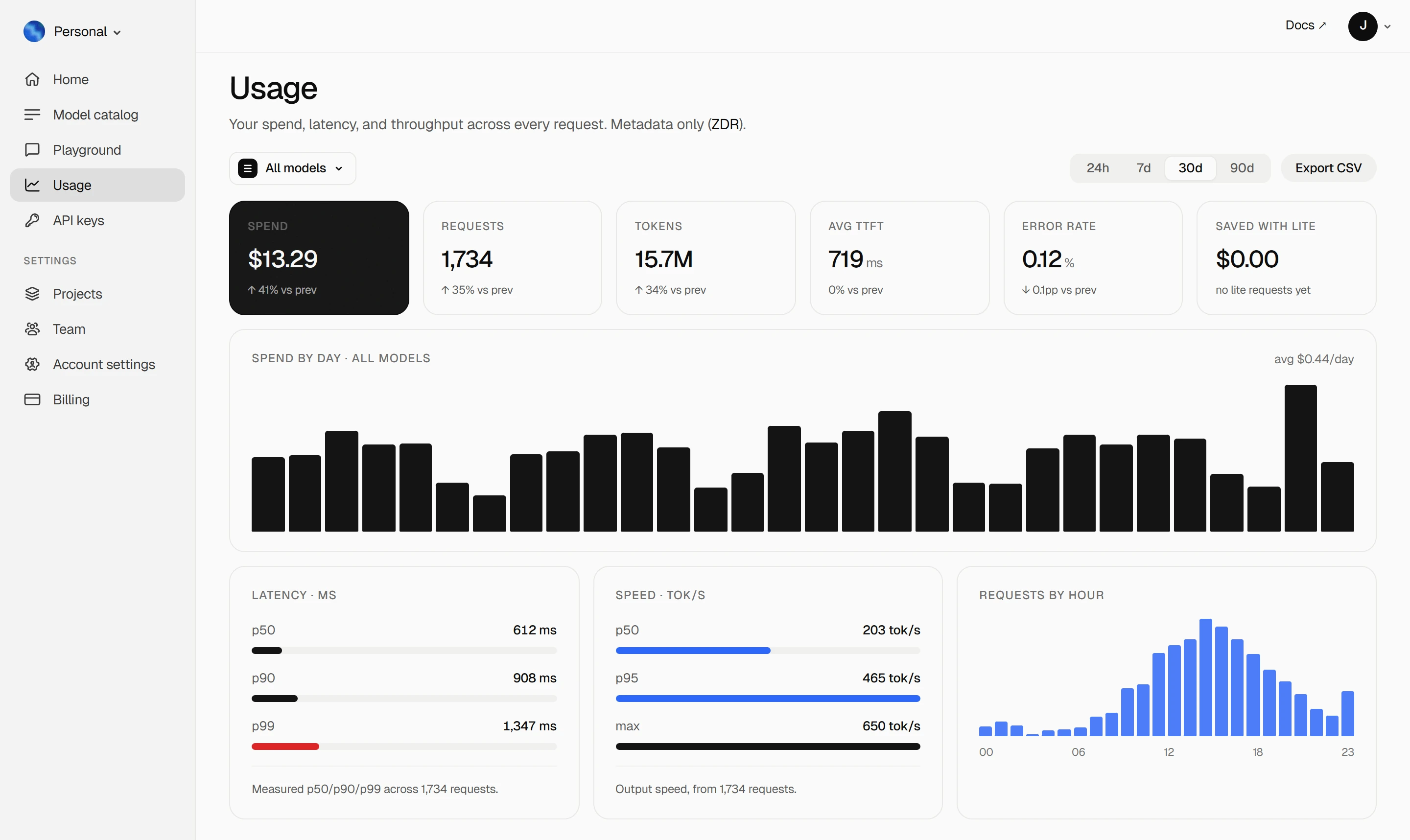
Your Keln **Usage** page shows your spend, tokens, latency and error rate. Keln stores metadata
only ([ZDR](capabilities/privacy.md)).
<figure class="kd-figure kd-figure--bento" markdown>
{ loading=lazy }
</figure>
<div class="kd-figure-cta" markdown>
[Create Keln account](https://app.keln.ai/signup){ .md-button .md-button--primary }
</div>
## Change or remove Keln
Open **Settings** → **Providers** and click **Change API key** or **Disconnect** on Keln.
## Where to go next
<div class="grid cards" markdown>
- [OpenAI SDK and compatible clients ↗](api/index.md)
Connect Keln to Python, TypeScript, LangChain, Vercel AI SDK, or curl.
- [Anthropic-compatible API ↗](api/anthropic.md)
Use Keln models with the Anthropic SDK and Messages API.
</div>
## Try Keln
Create a Keln account and API key to run open models in Kilo Code.
[Get an API key](https://app.keln.ai/signup){ .md-button .md-button--primary }
[Models & pricing ↗](models-pricing.md){ .md-button }
Kilo Code with Keln
Keln is built into Kilo Code. Add your API key and pick a Keln model.
What you need to start
Kilo Code installed in VS Code.
A Keln API key. Sign up at app.keln.ai, then open Keys →
Create key.
Connect Kilo Code to Keln
In Kilo Code, open Settings → Providers → Show more providers.
Search for keln and click Keln.
Paste your key into Keln API key and click Submit.
In the model picker below the message box, type keln and choose a model, such as
GLM-5.3.
Before your first message, add credit under Billing → Add credit. Keln returns a 402 error if your balance is empty.
Models
Kilo Code lists every Keln chat model, with its context window and image support. See
Models & pricing for prices.
Usage
Your Keln Usage page shows your spend, tokens, latency and error rate. Keln stores metadata
only (ZDR).