# pi with Keln
Use Keln models in pi, a terminal coding agent, by installing the Keln package. The package reads
Keln's live model list, so every Keln chat model appears in `/model`.
## What you need to start
- pi installed.
- A Keln API key. Sign up at [app.keln.ai](https://app.keln.ai), then open **Keys** →
**Create key**.
## Connect pi to Keln
### 1. Install the Keln package
```bash
pi install npm:pi-keln-provider
```
### 2. Set your Keln key
Set the `KELN_API_KEY` environment variable:
=== "macOS and Linux"
```bash
export KELN_API_KEY=sk-keln-…
```
=== "Windows PowerShell"
```powershell
$env:KELN_API_KEY = "sk-keln-…"
```
Add the line to your shell profile to keep it for new terminal windows.
Or run `/login` in pi, choose **Keln** and paste your key.
### 3. Pick a Keln model
Start pi in your project and open the model list:
```text
/model
```
Choose a Keln model, for example `keln/zai-org/glm-5.3`. Press `Ctrl+S` on a model to save it as
the default for new sessions. Run `/thinking` to pick a thinking level. pi offers the levels each
model supports.
Before your first message, add credit under **Billing** → **Add credit**. Keln returns a `402` error if your balance is empty.
## Models
pi lists all Keln chat models. See [Models & pricing](models-pricing.md) for the full list and pricing.
## Usage
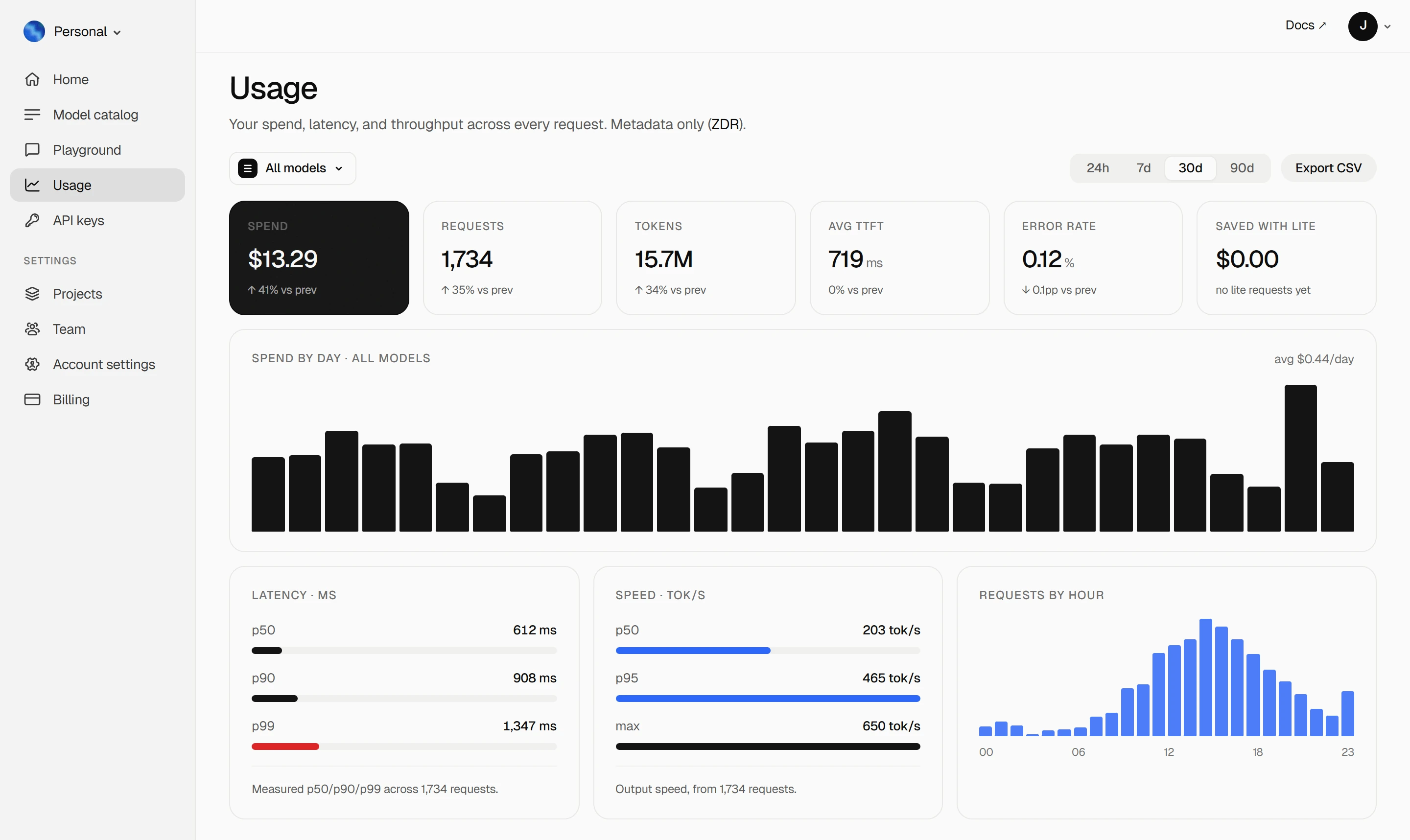
Your Keln **Usage** page shows your spend, tokens, latency and error rate. Keln stores metadata
only ([ZDR](capabilities/privacy.md)).
<figure class="kd-figure kd-figure--bento" markdown>
{ loading=lazy }
</figure>
<div class="kd-figure-cta" markdown>
[Create Keln account](https://app.keln.ai/signup){ .md-button .md-button--primary }
</div>
## Switch back
Open `/model` and pick a model from another provider. To remove Keln, run:
```bash
pi remove npm:pi-keln-provider
```
## Where to go next
<div class="grid cards" markdown>
- [OpenAI SDK and compatible clients ↗](api/index.md)
Connect Keln to Python, TypeScript, LangChain, Vercel AI SDK, or curl.
- [Anthropic-compatible API ↗](api/anthropic.md)
Use Keln models with the Anthropic SDK and Messages API.
</div>
## Try Keln
Create a Keln account and API key to run open models in pi.
[Get an API key](https://app.keln.ai/signup){ .md-button .md-button--primary }
[Models & pricing ↗](models-pricing.md){ .md-button }
pi with Keln
Use Keln models in pi, a terminal coding agent, by installing the Keln package. The package reads
Keln's live model list, so every Keln chat model appears in /model.
What you need to start
pi installed.
A Keln API key. Sign up at app.keln.ai, then open Keys →
Create key.
Connect pi to Keln
1. Install the Keln package
piinstallnpm:pi-keln-provider
2. Set your Keln key
Set the KELN_API_KEY environment variable:
exportKELN_API_KEY=sk-keln-…
$env:KELN_API_KEY="sk-keln-…"
Add the line to your shell profile to keep it for new terminal windows.
Or run /login in pi, choose Keln and paste your key.
3. Pick a Keln model
Start pi in your project and open the model list:
/model
Choose a Keln model, for example keln/zai-org/glm-5.3. Press Ctrl+S on a model to save it as
the default for new sessions. Run /thinking to pick a thinking level. pi offers the levels each
model supports.
Before your first message, add credit under Billing → Add credit. Keln returns a 402 error if your balance is empty.
Models
pi lists all Keln chat models. See Models & pricing for the full list and pricing.
Usage
Your Keln Usage page shows your spend, tokens, latency and error rate. Keln stores metadata
only (ZDR).